Windows/Chrome: Japanese IME suggestion list obscures inputted text #4089

Closed
opened 2016-06-27 17:44:03 +02:00 by marijnh · 8 comments
marijnh commented 2016-06-27 17:44:03 +02:00 (Migrated from gitlab.com)

Env
Windows 10
Chrome v51
Japanese MS IME
CodeMirror: v5.13.2 (also exists in v5.16 - and earlier versions)

To reproduce:

  • Open a code mirror mirror input area
  • activate the Japanese IME
  • type "nippon"
  • suggestion list appears

Expected Result:

  • list does not obscure the text that has been entered

Actual Result:

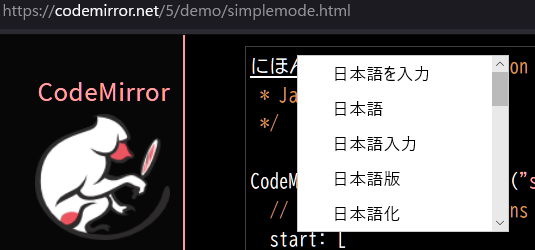
  • text is significantly obscured.
    cm-jaime-obscurestext
**Env** Windows 10 Chrome v51 Japanese MS IME CodeMirror: v5.13.2 (also exists in v5.16 - and earlier versions) **To reproduce:** - Open a code mirror mirror input area - activate the Japanese IME - type "nippon" - suggestion list appears **Expected Result:** - list does not obscure the text that has been entered **Actual Result:** - text is significantly obscured. ![cm-jaime-obscurestext](https://cloud.githubusercontent.com/assets/16923626/16385824/53d2c3d6-3c5c-11e6-8fc2-3d4b81d60807.png)
marijnh commented 2016-07-12 10:47:17 +02:00 (Migrated from gitlab.com)

I booted windows 7 and enabled Microsoft Japanese IME, and it's allowing me to type Japanese characters, but never pops up a suggestion list (neither in CodeMirror nor anywhere else). Is there something else I need to enable to get that behavior?

I booted windows 7 and enabled Microsoft Japanese IME, and it's allowing me to type Japanese characters, but never pops up a suggestion list (neither in CodeMirror nor anywhere else). Is there something else I need to enable to get that behavior?
marijnh commented 2016-07-12 10:57:02 +02:00 (Migrated from gitlab.com)

Oh, it was pressing space that triggered the menu. Unfortunately, on my system, both in Linux and Windows 7, the resulting widget is perfectly aligned with the bottom of the cursor. This might be related to your CSS -- could you see if it happens on the demo pages on http://codemirror.net on your system? If not, it would be helpful if you could set up a minimal demo page with your CSS in it that allows me to reproduce the issue.

Oh, it was pressing space that triggered the menu. Unfortunately, on my system, both in Linux and Windows 7, the resulting widget is perfectly aligned with the bottom of the cursor. This might be related to your CSS -- could you see if it happens on the demo pages on http://codemirror.net on your system? If not, it would be helpful if you could set up a minimal demo page with your CSS in it that allows me to reproduce the issue.
marijnh commented 2016-07-12 11:06:51 +02:00 (Migrated from gitlab.com)

On closer look at the screenshot, that is the project page, so I'll see if I can install windows 10 to see if it reproduces there.

On closer look at the screenshot, that _is_ the project page, so I'll see if I can install windows 10 to see if it reproduces there.
marijnh commented 2016-07-12 11:27:09 +02:00 (Migrated from gitlab.com)

Okay, on Windows 10 with Chrome 51 I could reproduce this. Attached patch works around the issue.

Okay, on Windows 10 with Chrome 51 I could reproduce this. Attached patch works around the issue.
marijnh commented 2016-07-12 11:27:39 +02:00 (Migrated from gitlab.com)

Um, I mean patch 51a1e7d, which I attached to the wrong issue.

Um, I mean patch 51a1e7d, which I attached to the wrong issue.
marijnh commented 2016-07-14 11:55:14 +02:00 (Migrated from gitlab.com)

Excellent @marijnh - thank you. Looks good to me also.

Excellent `@marijnh` - thank you. Looks good to me also.
marijnh commented 2018-09-06 19:31:37 +02:00 (Migrated from gitlab.com)

Apparently this is fixed, great!

Apparently this is fixed, great!
marijnh (Migrated from gitlab.com) closed this issue 2018-09-06 19:31:37 +02:00
marijnh commented 2022-10-09 13:01:58 +02:00 (Migrated from gitlab.com)

It seems that something is wrong with Firefox.
image

github.com/codemirror/codemirror5@e1fe2100d0/src/input/input.js (L123-L124)

The wrapping div should have height, shouldn't it?

This code

 let te = elt("textarea", null, null, "position: absolute; top: 0; bottom: 1em; padding: 0; width: 1px; height: 1em; min-height: 1em; outline: none") 
 let div = elt("div", [te], null, "overflow: hidden; position: relative; width: 3px; height: 1em; margin-bottom: -1em;") 

would produce something better, like this:
image

(1em should be replaced with 1.5em (==line-height) also?)

I'm not familiar with CSS. You all must know better. Thanks!

It seems that something is wrong with Firefox. ![image](https://user-images.githubusercontent.com/383537/194751690-a23a3f9e-9c81-41d5-b973-5d2c4c3c8abc.png) https://github.com/codemirror/codemirror5/blob/e1fe2100d0fdc7c34d47993f6514bdd2213c0015/src/input/input.js#L123-L124 The wrapping div should have height, shouldn't it? This code ``` let te = elt("textarea", null, null, "position: absolute; top: 0; bottom: 1em; padding: 0; width: 1px; height: 1em; min-height: 1em; outline: none") let div = elt("div", [te], null, "overflow: hidden; position: relative; width: 3px; height: 1em; margin-bottom: -1em;") ``` would produce something better, like this: ![image](https://user-images.githubusercontent.com/383537/194752509-4a37eb4d-44c6-4c7d-aed5-37ecda9b1730.png) (1em should be replaced with 1.5em (==line-height) also?) I'm not familiar with CSS. You all must know better. Thanks!
Sign in to join this conversation.
No labels
No milestone
No project
No assignees
1 participant
Notifications
Due date
The due date is invalid or out of range. Please use the format "yyyy-mm-dd".

No due date set.

Dependencies

No dependencies set.

Reference
codemirror/codemirror5#4089
No description provided.